Ask any AI photo generator for a single striking portrait and most will deliver. Ask for the same person in ten different scenes, and the field splits fast. Faces drift, eye colour changes, a jawline softens, and by the fifth image you are looking at a cousin rather than the person you started with. For artists, photographers and anyone building a series, that one test, keeping the same face, matters more than any single beautiful render.
This guide ranks the main approaches on that test, walks through the leading tools in each lane, and shows you how to run the same-face test on your own photos before you spend money on a series.
The quick answer: which approach keeps the face
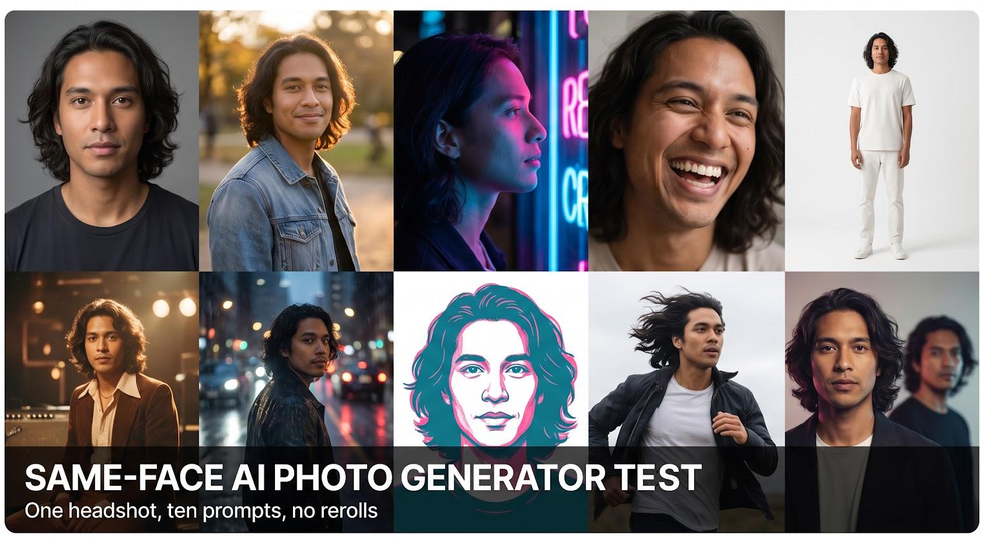
Face consistency depends less on which brand you pick than on how the tool learns who you are. Ranked on that one test, the approaches come out in this order:
- Tools that train a personal model on your photos. They learn your face from a set of images, so every new picture starts from the same identity.
- Tools that take one reference photo. They borrow your likeness from a single image each time, which works well for a few frames but drifts more over a long series.
- Prompt-only generators. They have no memory of you between images, so the face is rebuilt from text every time.
Within each lane, individual tools still differ in style range, editing, cost and privacy terms. The sections below cover those differences, so you can match a tool to your brief rather than to a headline.
First, a reality check: these tools are not all doing the same job
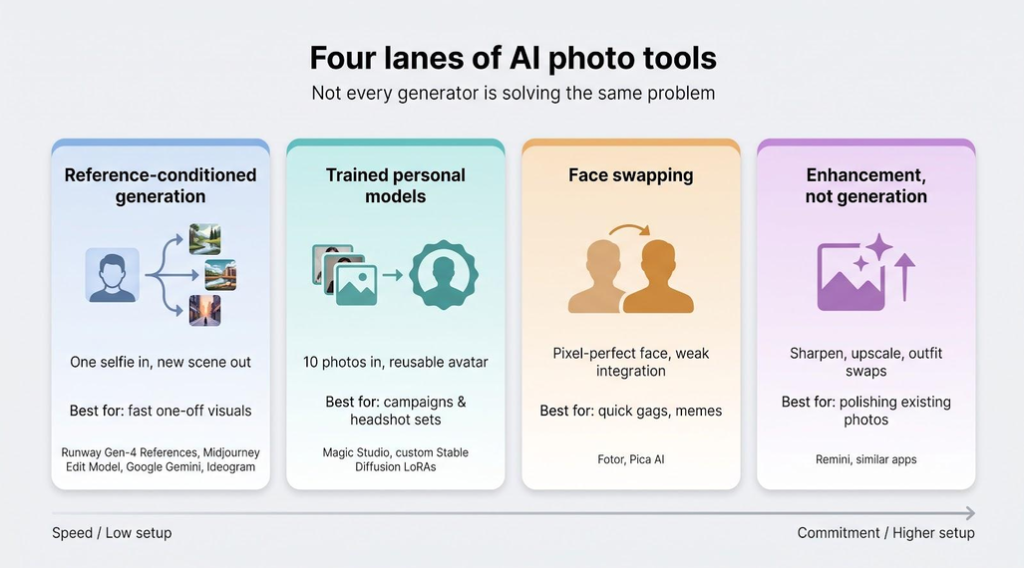
It is easy to compare every AI photo generator in one table, but the tools work in fundamentally different ways. A prompt-only generator is built to invent people, not to repeat one. Beyond that, the tools that work with a real face fall into four lanes, and judging them on the same-face test is fair only if you know which kind of tool you are holding.
Trained personal models
Upload a set of photos, wait while the tool learns your face, then get a reusable private model. Magic Studio is the clearest example: it asks for about 10 photos and trains a private model for your shoot. The setup takes more effort, but the model starts every image from the same learned identity.
Reference-conditioned generation
One photo in, new scene out, no training required. Tools such as Runway Gen-4 References, Midjourney’s Edit Model, Google Gemini and Ideogram accept a single headshot and remix it with every prompt. Setup is instant, but identity can drift when lighting or angles shift.
Face swapping
Pixel-level copy, weak integration. Drag-and-drop engines such as Fotor (commercial use allowed under its help-center terms) or Pica AI (licence limited to personal, non-commercial use) paste the reference face onto stock bodies. The face itself may match closely, but mismatched lighting and static expressions are common, so these tools sit outside the main ranking.
Enhancement, not generation
Retouchers sharpen what already exists. Apps like Remini upscale, denoise and swap outfits inside the original crop. That works for refreshing a portrait but not for a full-body action scene. iOS plans start near $10 per week and limit daily credits, so costs climb on large projects.
Use the right lane for the brief: trained models for campaigns and portrait series, one-photo references for speed, swaps for quick gags, and enhancers when you need polish, not variety.
1. Personal-model tools: the most consistent face
This approach asks more of you up front. You upload a set of photos, the tool trains on them, and only then do you start creating. The payoff is consistency: because the model has learned your face from many angles and lighting conditions, it can place you in a new scene without losing the features that make you recognisable.
Magic Studio: the personal-model baseline
Magic Studio is a clear example. It describes itself as your personal AI photographer: you upload photos once, the AI learns how you look, and you can then create new photos of yourself in different settings, including professional headshots.
How it works. For headshots it asks for about 10 photos with different backgrounds, face angles and lighting. A private model is trained for your shoot only, and your photos are not used for any other training.
Speed. Results are ready in roughly 15 to 60 minutes, depending on the pack. The Starter pack usually takes about an hour, and the Basic and Premium packs are faster.
Cost. The Starter pack starts at $59 for 50 headshots in 5 looks, with Basic and Premium tiers above it. The packs are one-time purchases rather than subscriptions. You pay only after you love your headshots: you can preview your first 50 photos (watermarked) before paying. If you get fewer than 4 decent headshots and have not downloaded any, you can request a refund within 3 days. Background and outfit changes cost extra.
Output. Headshots come at 1024 × 1024 by default, and you can upscale to 4K for a fee or credits. The Premium pack gives 4096-pixel images.
Privacy. Data is deleted automatically 30 days after your headshots are created, and you can delete it any time before that.
Reputation. The service is rated 5 out of 5 on Trustpilot across about 17,000 reviews.
Best fit. HR managers, PR leads, authors and artists who need dependable, consistent portraits without another photo shoot.
Main catch. The setup: you need a good set of source photos, and the better and more varied they are, the better the likeness. Magic Studio’s headshot packs focus on professional portraits; if your brief is a heavily stylised illustration, the prompt-only and reference tools below are built for that kind of range.
Other ways to train a personal model
You can also train a personal model yourself. In a local Stable Diffusion setup, a LoRA or PhotoMaker-style adapter trained on a set of selfies plays the same role as a hosted personal model, at the cost of setup time and technical skill. Adobe Firefly’s custom models offer a similar idea inside Adobe’s ecosystem, though availability varies by plan. Whichever route you take, the principle is the same: the more the tool has learned about one face, the less it has to guess on each new image.
2. Reference-photo tools: good for a few frames
These tools take a single image of you and use it to guide each new picture. They are quick and need no training step, which makes them handy for a profile picture or two. Over a longer series, though, small details such as the hairline, ear shape or the exact eye colour tend to wander, because the tool is reinterpreting one photo every time rather than drawing on a learned model.
They work best when you need a handful of images fast and can pick the closest matches by hand. Here is how the main options differ.
Runway Gen-4 References: built for storyboards and recurring characters
Workflow perks. You can save named references, share them with teammates and reopen them weeks later, which suits multi-scene storyboards and recurring characters.
Style range. Gen-4 handles editorial fashion, handheld documentary grain and full cinema lighting. As with any reference tool, check the hardest scenes (extreme stylisation, fast motion) for drift.
Cost. Each 1,024-pixel render uses seven credits on the Standard plan, and free credits run out quickly. Keep an eye on the credit meter if your storyboard grows from ten frames to a hundred.
Bottom line: for projects that depend on the same face across many scenes, Runway’s saved references make it one of the most practical single-photo options.
Midjourney V8.2: the widest style range, if the face survives it
Style range. Cinematic backlights with lens flare, ’70s film grain, vaporwave gradients: Midjourney is known for producing very different looks from one prompt family.
Identity. The more you push the –stylize value, the more freedom the model takes with the image, and that can include the face. Keep stylisation lower for identity-critical shots and push it only when style matters more than likeness.
Workflow quirks. Midjourney started in Discord and now also has a web app. Generations are public by default, and Stealth privacy mode is available only on the $60 Pro tier or higher. Teams that work in Slack or Microsoft Teams will need an extra tab.
Bottom line: when the brief calls for bold style, Midjourney delivers gallery-ready spectacle. Budget for Pro if you need private generations.
ChatGPT Images: the conversational chameleon
Editing agility. After the first image, you can type a change such as “same pose, warmer tungsten light” and get a revised shot without writing a fresh prompt or hunting for sliders.
Identity. Fast-motion prompts are a common weak spot for reference tools, because motion blur hides the facial landmarks the model relies on. Slower, posed scenes are safer.
Cost. API costs vary by resolution, so set explicit caps before team sprints.
Policy and privacy. OpenAI does not train future models on API inputs by default, which is a helpful guardrail for client work.
Bottom line: when you need rapid, conversational revisions, ChatGPT Images is a quick path to a consistent face. Keep action prompts calmer and check each frame.
Google Gemini / Nano Banana: the multi-reference all-rounder
Editing flow. Drop images into a references panel, tweak the likeness and style settings, then reuse the set next session; think Google Docs meets a mood board. Using several reference images, rather than one, gives the model more to work with.
Cost. On the Google AI Pro tier ($19.99 per month) generation is included. Through the API, Nano Banana 2.1 costs about $0.027 per image. Enterprise seats roll access into a flat fee; check region-specific pricing.
Privacy. References live in your Google account and can be removed. Data-use terms differ between consumer and business accounts, so check the terms for your plan.
Best for. Teams juggling multiple angles without full model training, designers already inside Google Workspace, and fast iterations on lightly stylised art.
Main catches. The style range feels conservative next to Midjourney, licence layers can confuse procurement, and a 10-reference cap forces pruning on large character bibles.
Ideogram 3.0 Turbo: faces plus legible text
Typography. Ideogram’s strength is lettering. For an album cover or poster that needs both a recognisable face and readable copy, it is one of the few generators built for that combination.
Workflow. Character Reference costs about $0.10 per image through the API, or uses priority credits on the $20 per month Plus tier. Daily caps reset at midnight PDT. You can store eight references at once; add a ninth and you must delete one.
Rights. Commercial use is granted and outputs stay private unless you share a link, but Ideogram may showcase standout images in its marketing unless you opt out, so double-check client NDAs.
Bottom line: when a project needs a face and copy you can read from across the room, Ideogram belongs on the shortlist. Budget priority credits for every mock-up round and trim your character list to stay under the cap.
FLUX BFL-3: the photorealism specialist
Photorealism. FLUX is known for realistic skin, hair and texture detail, which makes it a good fit for beauty, fashion and product hero shots.
Cost. Renders cost about $0.048 each at 1,024 pixels.
Workflow. You pay per render and there is no live edit, so each tweak uses a fresh credit. Seeds are API-only, so creators who prefer a visual interface will feel some iteration friction.
Rights. Commercial use is included, there is no public gallery, and references are deleted on request. Record the exact model ID, because several hosts share the FLUX brand.
Bottom line: choose FLUX when photoreal detail matters more than extreme style variation.
Leonardo AI character mode: the shape-shifting creative suite
Creative flexibility. Mask the face, paint a new jacket, reroll only the background, then export a layered PSD for hand-off to Adobe tools.
Cost. Each 1,024-pixel render costs around 14 tokens; the $30 per month Artisan plan bundles 25,000 tokens, so token bundles stretch far on targeted rerolls.
Licensing. Built-in models include commercial rights, but any model marked “community” may require attribution or forbid resale. Check the badge before client work.
Why skip it. Feature names and credit tables change often, identity can drift on extreme angles, and licence clarity drops once you move into community checkpoints.
Bottom line: Leonardo is a flexible workbench for iterative design comps, as long as you verify each model’s rights.
Stable Diffusion + ComfyUI: the most control, the most work
Stable Diffusion sits in both lanes. With an adapter such as InstantID it works from one reference photo; with a LoRA trained on a set of selfies it becomes a personal-model tool.
Creative freedom. Anything goes: woodcut styles, ControlNet hand fixes, Real-ESRGAN upscales, all reproducible through a saved workflow graph.
Cost. Run locally, your cost is electricity and hardware rather than credits. Renting a cloud GPU changes the maths, so budget for GPU time or power, plus your own hours.
When it shines. Privacy-focused studios that avoid cloud uploads, artists chasing styles no hosted tool covers, and developers embedding identity pipelines in larger apps.
When it stalls. New users can drown in node graphs, model updates can break yesterday’s workflow, and each checkpoint or extension has its own licence. Skip the fine print and you risk unusable art.
Bottom line: ComfyUI is the most flexible identity toolkit available, but only if you treat it like software development.
3. Prompt-only generators: best for invention, weakest for likeness
Prompt-only generators are superb at creating characters, scenes and styles from text. They are not designed to repeat a real person. Even with a careful description, each new image is a new interpretation, so the face changes from frame to frame. For concept art, mood boards and illustrations that is a strength. For a portrait series of a real person, it is the wrong tool.
Useful alternatives that are not directly comparable
Some tools excel at price, speed or novelty but are not built for the same-face test. Keep them for side projects, not core production.
Fotor face swap and multi-model editor
Fotor copies your face onto stock bodies. The face can look right at first glance, but check the lighting and the mouth area closely: swaps often look frozen or out of place. Pricing: a free tier with a watermark; paid plans from $8.99 per month. Commercial use is allowed, but Fotor disclaims clearing third-party rights, so likeness risk stays with you.
Pica AI
Mobile-first and meme-fast. Tap a template and get a sitcom-style headshot in seconds. The terms restrict outputs to personal, non-commercial use, so it is not an option for client or commercial work at any price.
How to run the same-face test yourself
You do not need a lab to see which tool keeps your face. A simple, honest test with your own photos tells you more than any ranking, including this one.
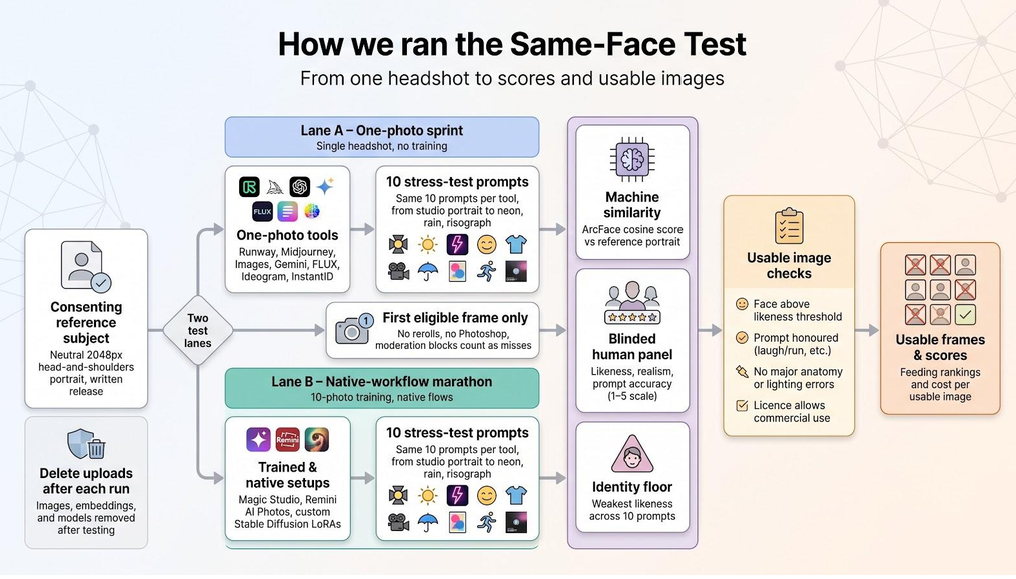
Start with consent
Use your own face, or get written permission from the person whose face you upload, covering both the uploads and any publication. Use a clear, neutral head-and-shoulders photo with no filters, and strip location data. When you finish with each tool, delete the source photos, references and any trained models, or ask support to do it if there is no delete button. If you can, repeat a few prompts with volunteers of different skin tones, ages and genders: results that look fine on one face can drift on another.
Pick ten varied scenes
Mix lighting (daylight, studio, evening), angles (front, three-quarter, profile) and settings (office, outdoors, studio backdrop), and remind each tool to keep age, skin tone and facial structure intact. A demanding set looks like this:

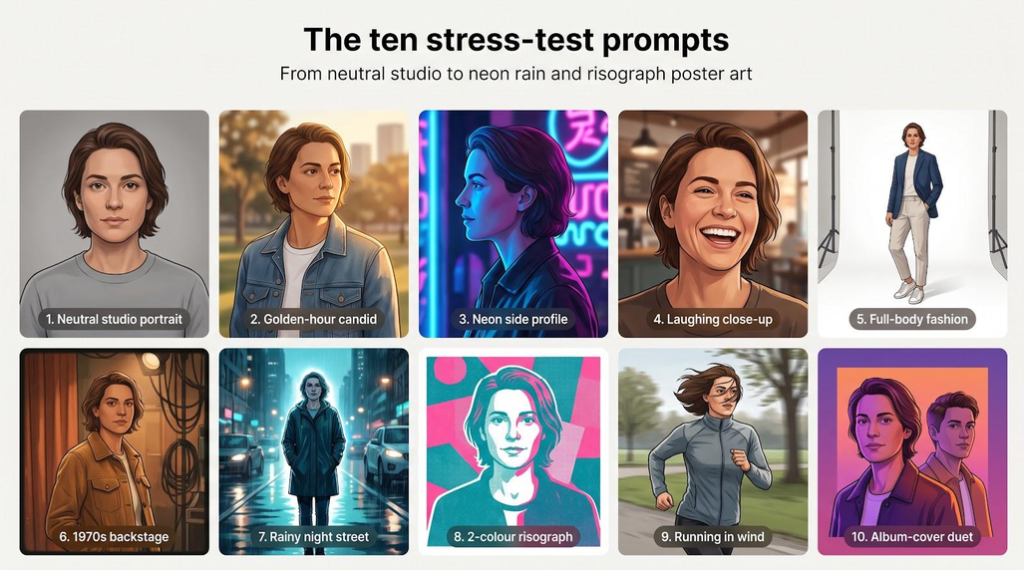
- Neutral studio, 85 mm portrait, soft light
- Outdoor candid at golden hour, denim jacket
- Side profile under blue and magenta neon
- Close-up laugh, teeth visible
- Full-body fashion look on a white backdrop
- Warm, grainy 1970s backstage snapshot
- Night street in rain, cinematic backlight
- Two-colour risograph illustration
- Running through wind, hair partly covering the face
- Album-cover duet with one supporting character
Give each tool its recommended inputs
Generate the same ten scenes in each tool, using what it was designed for: a photo set for personal-model tools, one clear photo for reference tools, a careful description for prompt-only tools. Comparing a one-photo tool against a trained model is fine, as long as you note which lane each one is in.
Do not cherry-pick
Decide your rule before you start. For example, score the first image each tool gives you, with no rerolls and no manual fixes, and count moderation blocks as misses. If you allow rerolls, allow the same number for every tool. Keep the rejects as well as the keepers, so you can see where each tool fails.
Lay the results side by side and count the keepers
Ask one question per image: would someone who knows you recognise you instantly? The tool with the most instantly recognisable images wins this test, whatever its other strengths.
Add a simple score if you need one
If you are choosing for a team, a weighted score helps you explain the decision.
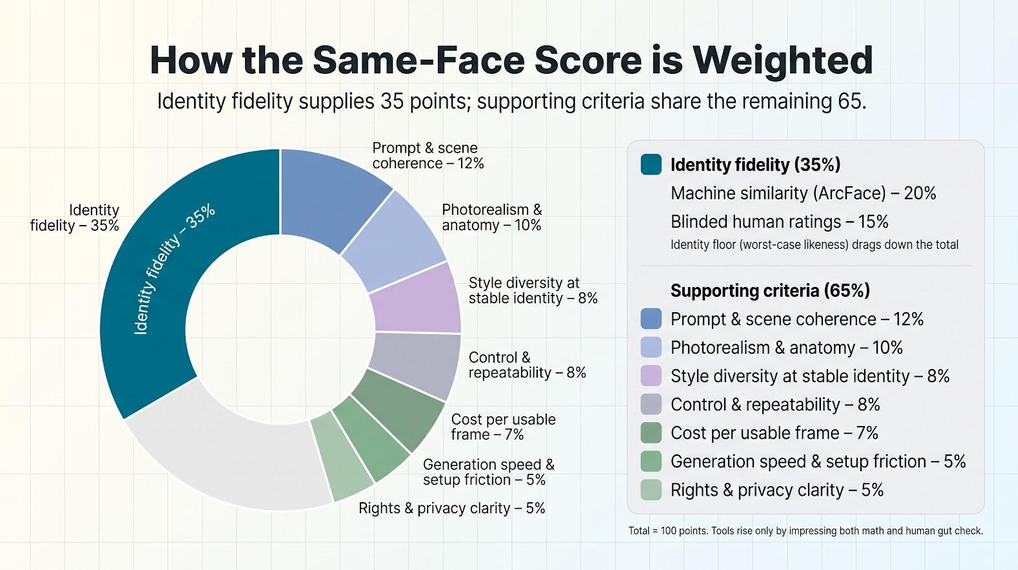
One reasonable weighting puts likeness first:
-
- Likeness (about a third of the score). Combine a face-similarity check, such as an open-source embedding model like ArcFace if you are technical, with ratings from a few people who know the subject. Also note the weakest image in the set: one bad miss can sink a campaign.
- Prompt and scene accuracy. Did the “laugh” show teeth? Does the “run” show motion?
- Photorealism and anatomy. Hands, ears, glasses and lighting.
- Style range while keeping identity.
- Control and repeatability.
- Cost per usable image.
- Speed and setup effort.
- Rights and privacy clarity.
What counts as a usable image
Treat the results the way a client would. An image is usable only if:
- the face is clearly the same person;
- the prompt is honoured;
- there are no major anatomical or lighting errors, such as fused fingers or blown-out foreheads;
- the licence permits the use you have in mind, including commercial use if you need it.
Only images that clear all four gates count towards your cost per usable image, and that figure often tells a harsher story than the sticker price.
The real cost: cheap images versus cheap usable images
A low per-image headline means little if half the outputs go in the bin. The number that matters on a production budget is cost per usable image: what you spent, divided by the images you would actually publish.
Work it out for each tool in your test:
- Credit and subscription tools: the credits or plan share you used, divided by your keepers.
- One-time packs: the pack price, divided by the photos you would actually use.
- Local setups: electricity and hardware, plus your own time. Local Stable Diffusion looks free until you put an hourly rate on troubleshooting.
Before chasing the lowest per-render price, ask two questions:
- How many images survive quality control?
- What is your time worth for rerolls and fixes?
Answer honestly, and the cheapest headline price often lands in the middle of the pack.
Best approach by creative use case
Fashion lookbooks
Full-body realism and consistent garments matter. A reference tool with saved, multi-image references, such as Runway, is a practical start; a trained personal model or a Stable Diffusion LoRA gives more consistency if you have time to set it up. Check shoes and hands closely.
Album and single covers
You need a face and readable text. Ideogram is built for typography; Midjourney gives more dramatic art but you may need to add the lettering afterwards in a design tool.
Storyboarding and pitch decks
Reusable character references keep panels lined up from frame to frame, which favours tools like Runway. Local Stable Diffusion costs little per image but adds production time, which suits independent creators more than agency deadlines.
Artist press kits and author portraits
When you need 15 matching portraits rather than one hero image, train once. A personal-model tool such as Magic Studio is designed for exactly this: a consistent set of professional portraits from one upload session. One-photo tools can drift between takes, which worries publicists.
Editorial illustration and zines
Style range matters more than perfect likeness here. Midjourney with higher stylisation and two-colour prompts suits risograph-style work; Stable Diffusion with an identity adapter can match it if you have time.
Comics and narrative worlds
You need the same character across many panels. Saved references in Runway, or a Stable Diffusion LoRA combined with an identity adapter, are the usual routes. Check every panel for a rogue jawline.
Portrait-photography previsualisation
Conversational tools such as ChatGPT Images let you describe lighting changes in plain words (“drop the key light one stop”) and see the effect quickly, which is useful before a real shoot.
Privacy, copyright and who owns your face
“Commercial use allowed” rarely tells the whole story. Check these four points for every tool you use:
- Permission to upload is not the same as permission to publish. OpenAI, Runway and Midjourney require that you own or have consent for any likeness you upload. Take a headshot from the internet and you face the publicity-rights claim, not them.
- Copyright vs. licence. U.S. law still debates whether AI images can be registered, but platform terms are clearer: you may use the file subject to any third-party rights inside it. Adobe Firefly offers limited indemnity for its first-party models, which helps but is not blanket immunity.
- Data retention and training. Know each tool’s window before you promise a client anything. Magic Studio trains a private model for your shoot only, does not use your photos for any other training, and deletes data automatically 30 days after your headshots are created; you can delete it any time. Runway keeps references until you delete them. OpenAI does not train future models on API inputs by default.
- Public galleries leak fast. Midjourney shows every generation unless you pay for Stealth mode. Ideogram may showcase standout art unless you opt out. If launch secrecy matters, upgrade or choose another tool.
Four-step safety checklist
- Get written consent for every face you upload.
- Screenshot the licence page on the day you generate; terms change.
- Delete references and personal models as soon as the project wraps.
- Keep generations private (Stealth mode, private links or a local run) if the work is under embargo.
Follow those steps and you will spend more time art-directing and less time emailing lawyers.
What any same-face test cannot prove
Even a careful test has limits:
- One face is not every face. Results can differ across skin tones, ages and lighting conditions, so test with more than one person if your project covers many people.
- Models update quietly. A prompt that works today can drift tomorrow, so retest before delivery.
- Cost per image leaves out your labour. An hour spent debugging a local setup makes “free” images expensive fast.
Treat any ranking, including this one, as a compass, not a contract. Your project constraints, and your legal counsel, decide the final route.
Conclusion
If you need one striking image, almost any modern AI photo generator will do. If you need the same face across a series, the deciding factor is whether the tool learns your face or reinvents it every time. Personal-model tools such as Magic Studio keep the likeness most consistently, reference-photo tools manage a few frames, and prompt-only generators are best kept for invention. Run the ten-scene test with your own photos, count the images you would actually use, and let that number make the choice.