

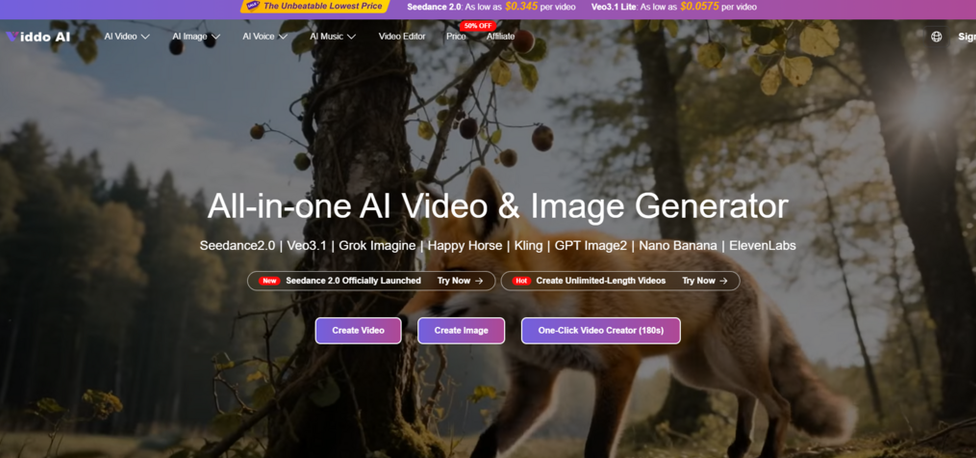
The generative video market has fragmented fast. By mid-2026, creators face a paradox of choice: dozens of platforms, each claiming best-in-class output, each demanding its own subscription and learning curve. After weeks of working with five distinct platforms—spanning multi-model aggregators, cinematic engines, motion-control specialists, template-driven suites, and avatar presenters—the clearest takeaway is that no single tool wins every job. The right choice depends on what you are making, how fast you need it, and how many different styles your content calendar demands. This breakdown covers each platform through the lens of real production tasks, not marketing pages. The AI Video Generator I started with was Viddo AI, a multi-model aggregator that set an interesting baseline for everything that followed.
How Each Platform Approaches Video Generation Differently
Before diving into individual tests, it helps to understand the five distinct philosophies these platforms represent. Viddo AI bundles twenty-plus third-party models under a single interface and credit pool. Runway focuses on cinematic consistency with proprietary generation and editing tools. Kling AI specializes in motion dynamics and human realism. InVideo AI wraps generation inside a full production suite with stock footage, voiceover, and templates. Synthesia replaces cameras entirely with AI avatars that speak from scripts. These are fundamentally different products solving different problems, which is exactly why testing them against shared scenarios reveals so much.
Viddo AI: Twenty-Plus Models Behind One Dashboard
Viddo AI integrates models from Google, ByteDance, Kuaishou, Runway, MiniMax, and others into a unified workspace. You select a model—Veo 3.1, Seedance 2.0, Kling 3.0, Runway Gen-4, Hailuo, Wan, among others—then enter a prompt or upload an image, set parameters like aspect ratio and resolution, and generate.
Strongest Use Case: Rapid Model Comparison on the Same Brief
The defining advantage is flexibility. I ran an identical prompt through three different engines in under ten minutes without switching tabs, accounts, or billing systems. One model returned warm, saturated tones with smooth motion. Another delivered cooler color science and sharper detail. A third emphasized dramatic lighting with slower camera movement. Being able to compare these side by side and choose the best fit for a specific brief is a workflow benefit no single-model platform can replicate.
Where Viddo AI Excels Beyond Model Variety
The credit-based pricing means you pay per generation rather than per subscription. For creators whose production volume fluctuates—heavy one week, light the next—this avoids the idle subscription waste that accumulates across multiple platforms. The interface also includes an AI prompt assistant, web search toggle, and seed parameter for reproducibility. Resolution options span 480p to 1080p, with aspect ratios from 16:9 through 21:9. Additional tools like video enhancement, lip sync, AI avatars, and one-click long video creation round out a surprisingly deep feature set for an aggregator.
Practical Limitations to Consider
Because Viddo AI aggregates models rather than building them, you rely on third-party engines for output quality. Model-specific advanced features available on native platforms—like Runway’s Motion Brush or Kling’s storyboard tool—may not surface here. Prompt quality remains the primary variable: vague inputs produce generic results regardless of which model you select. Complex scenes may require multiple generation attempts, and the fifteen-second single-generation cap means longer content depends on the video extend feature.
Runway Gen-4: Built for Cinematic Production Workflows
Runway has positioned itself as the professional filmmaking tool in this space. Gen-4 generates clips up to ten seconds at resolutions up to 1080p with 24 frames per second, focusing on character consistency, realistic motion, and strong prompt adherence.
Strongest Use Case: Narrative Sequences With Consistent Characters
Runway’s reference image system allows you to lock a character’s appearance across multiple generations. Upload one image and the model maintains consistent facial features, clothing, and proportions across different lighting conditions and camera angles. For short film sequences or branded content that needs visual continuity, this is a genuine differentiator.
Trade-Offs at the Professional Tier
Runway’s Standard plan starts at approximately twenty-eight dollars per month with credit-based billing on top. The ten-second clip limit means longer content requires stitching. The built-in Aleph editor allows in-video editing—removing objects, adjusting lighting, transforming style—which no other platform in this list offers natively. However, that depth of control comes with a steeper learning curve and higher per-clip costs compared to aggregator pricing.
Kling AI 3.0: Motion Control and Human Realism
Kling 3.0, released in early 2026, brought multi-shot storytelling, native multilingual audio, and what many independent reviewers have ranked as the top benchmark score among current video models.
Strongest Use Case: Human Subjects With Natural Movement
Kling’s 3D face and body reconstruction technology reduces the warping and distortion common in competing models. In my testing, human subjects maintained realistic proportions and natural movement throughout the clip duration. The Motion Brush feature—where you draw custom motion paths directly on a frame—gives directorial control that text prompts alone cannot achieve.
The Credit Math Requires Careful Planning
Kling’s pricing starts at roughly seven dollars per month for the Standard tier with 660 credits, but a five-second 1080p clip with audio can consume forty or more credits. At realistic iteration rates of three to five takes per usable clip, heavy users may find credits depleting faster than expected. Credits do not roll over between billing cycles, which means unused allowance disappears at the end of each month.
InVideo AI: End-to-End Production From a Single Prompt
InVideo AI takes a fundamentally different approach. Rather than generating raw video clips from prompts, it produces complete videos—with script, stock footage, voiceover, subtitles, music, and transitions—from a single text input.
Strongest Use Case: High-Volume Social and Marketing Content
For teams that need twenty to forty videos per month with consistent branding, InVideo’s template-and-stock pipeline is remarkably efficient. The platform integrates iStock footage, voice cloning, and brand kits into one workflow. It has also partnered with both OpenAI and Google to include generative models like Sora and Veo 3.1 within the editing pipeline.
Where the Template Ceiling Becomes Visible
The output inherits the visual language of stock footage, which means videos look polished but not unique. Creators seeking distinctive cinematic or generative aesthetics will find InVideo’s strength—speed and consistency—is also its constraint. Pricing starts around twenty-five dollars per month for the Plus tier, with AI generation minutes that do not roll over.
Synthesia: AI Avatars That Replace the Camera Entirely
Synthesia replaces cameras, studios, and on-screen talent with AI avatars that deliver scripted content in over 160 languages. It is the most specialized tool in this group, designed primarily for corporate training, onboarding, and internal communications.
Strongest Use Case: Multilingual Training at Enterprise Scale
A single script can be rendered with the same avatar in dozens of languages without re-filming. For global companies producing training content across markets, this capability alone justifies the platform cost. Over 240 stock avatars and personal avatar creation give teams a consistent digital presenter across all materials. Pricing starts at twenty-nine dollars per month for ten minutes of video on the Starter plan.

Creative Range Is Intentionally Narrow
Synthesia does not generate cinematic scenes, product animations, or social reels. Its avatars, while increasingly realistic, still carry a recognizable digital quality that some audiences find distracting. The platform is purpose-built for structured, script-driven content—and within that lane, it has few serious competitors.
How Viddo AI’s Workflow Operates Step by Step
Understanding the aggregator model requires walking through its actual generation flow, which the platform condenses into three core steps.
Step One: Select a Model That Matches the Deliverable
Credit Cost Previews Appear Before You Commit
The model picker is the first decision point. Each engine carries a different credit cost—Veo 3.1 Lite is significantly cheaper per generation than Veo 3.1 standard, for example—and the interface displays estimated credit consumption before you hit generate. This preview turns model selection into both a creative and a budgeting decision.
Step Two: Enter a Prompt or Upload Source Material
The AI Prompt Assistant Bridges Idea and Description
You can type a detailed prompt manually, upload an image for image-to-video conversion, or use the built-in AI prompt expander to turn short keywords into structured scene descriptions. The expander is not perfect—it occasionally defaults to cinematic cliches—but it measurably reduces blank-page friction for users still developing prompt skills.
Step Three: Set Parameters and Generate
Aspect Ratio, Resolution, and Duration Lock In Before Rendering
Choose from six aspect ratios, three resolution tiers, and video duration up to fifteen seconds. The web search toggle and seed field offer additional control. Once set, generation begins in the background, and you can queue multiple jobs across different models simultaneously.
Side-by-Side Comparison Across Key Workflow Dimensions
| Dimension | Viddo AI | Runway Gen-4 | Kling AI 3.0 | InVideo AI | Synthesia |
| Core approach | 20-plus third-party models, one dashboard | Proprietary cinematic engine | Motion and human realism focus | Template plus stock plus AI | AI avatar presenter |
| Best content type | Varied short-form, model comparison | Narrative film, branded sequences | Human-centric, dynamic motion | Social marketing, explainers | Corporate training, multilingual |
| Model flexibility | High, multiple engines per session | Single proprietary model family | Single proprietary model family | Stock plus integrated generative models | Avatar-only, script-driven |
| Learning curve | Low to moderate | Moderate to high | Moderate | Low | Low |
| Pricing entry point | Credit-based, pay per generation | Around 28 dollars per month plus credits | Around 7 dollars per month, 660 credits | Around 25 dollars per month, minute caps | Around 29 dollars per month, 10 minutes |
| Commercial use | Paid plans include commercial rights | Paid plans include commercial rights | Paid plans include commercial rights | Paid plans include commercial rights | Paid plans include commercial rights |
| Unique advantage | Switch models without switching platforms | In-video editing with Aleph | Motion Brush for directorial control | Full video from single prompt | 160-plus language avatar delivery |
Honest Constraints That Apply Across All Five Platforms
Generative video in 2026 is powerful but not predictable. Results vary between runs even with identical settings across every tool tested. Text rendering inside generated video remains unreliable industry-wide. Single-generation clip lengths top out between five and fifteen seconds on most engines, meaning longer content requires extend or stitch features that can introduce continuity gaps. Free tiers universally apply watermarks and restrict commercial use. And no platform guarantees that the first generation will be the final one—budget for iteration, regardless of which tool you choose.
Picking the Right Generator by Matching Tool to Task
The most productive approach is not picking one platform and forcing every project through it. Cinematic brand work benefits from Runway’s consistency and editing depth. High-frequency social content fits InVideo’s automated pipeline. Multilingual corporate training belongs on Synthesia. Human-centric reels with precise motion play to Kling’s strengths. And for creators who produce across multiple content formats and need access to many model families without managing separate accounts, Viddo AI eliminates the friction of juggling platforms—letting you test, compare, and select the right engine for each job from a single workspace.